Manage trackings
Manage customers
Manage hubs
Track your package!
Enter your tracking number to see the latest shipment information:
Tracking number
Courier code
Shipping
date
Delivery date
Delivery date
Transit time
Route
Route
Service
Weight
Weight
Travel History
Shipping Calendar
Weekly tracking status (Last 3
months)See
dashboard
Trackings (Last 3 months)See all trackings
| Tracking number | Customer | Status |
|---|
Customers (Last 3 months)See all customers
| Customer | Trackings | Weight | Shipping costs |
|---|
Select date range:
Delivered
0
Transit
0
Created
0
Exception
0
Tracking status
Weekly tracking status
Transit Time (Average)
Tracking status vs hubs
Tracking status vs customers
Avg. Transit Time vs customers
Weekly shipping costs
Weekly shipping costs (avg) vs hubs
Weekly shipping costs (avg) vs courier
Select date range:
Add tracking
| Order Number | Tracking number | Shipping date | Last update | Courier | Status | Transit time | Origin | Destination | Customer | Shipped from | Shipped to | Shipping costs | Package weight | Origin City | Destination City |
|---|
Team access
Give a teammate access to this account. They log in with their own email and
password and see this account's data. They can also create trackings themselves —
both in the web app and in the extensions — which use up this account's capacity.
You can remove them again at any time.
Admin · Team access
Admin only. Grant a team member access to any account by entering the account
owner's email and the teammate's email. The teammate logs in with their own
credentials and acts as that account (consuming its capacity).
| Account owner | Team member |
|---|
Customers
Add customer
| Customer Id | Customer name | Customer email | Alerts |
|---|
Hubs
Add hub
| Hub Id | Hub name | Hub owner | Hub address | Hub email | Alerts |
|---|
Information
To receive alerts on your shipments, you can set them up below. You can change the email
address where you want to receive the alerts. This is independent from your login email
address. You can receive alerts for different delivery status and based on the days passed
since your packages were sent. Just check the below options which are important to you. For
sending alerts to your hubs and customers, please visit the Hubs and Customers tab to edit
your preferences.
Email Alerts
Please enter a valid email address.
You can use a different email for alerts. Your login email will not change.
Hub Alerts
Please manage hub alerts in Hubs tab
Customer
Alerts
Please manage customer alerts in Customers tab
How to install Globalpackagetracker Excel Add-In in 60 seconds!
Step 1:
Download the Add-In here: Download Microsoft Excel Add-InStep 2:
Follow these simple steps in Microsoft Office Excel Online: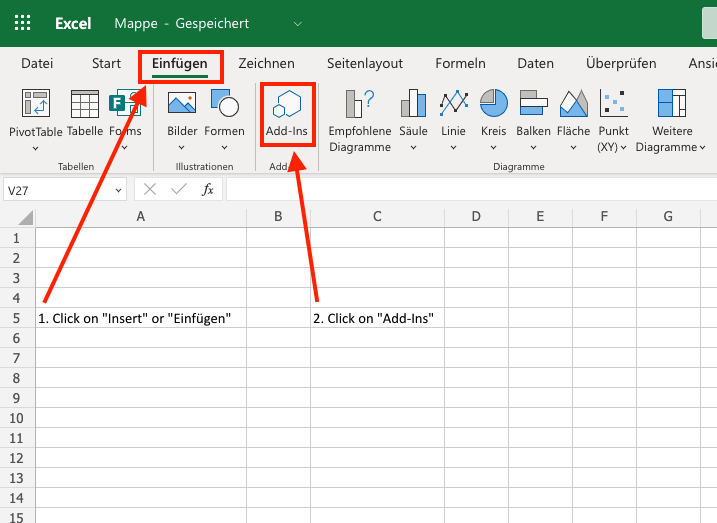
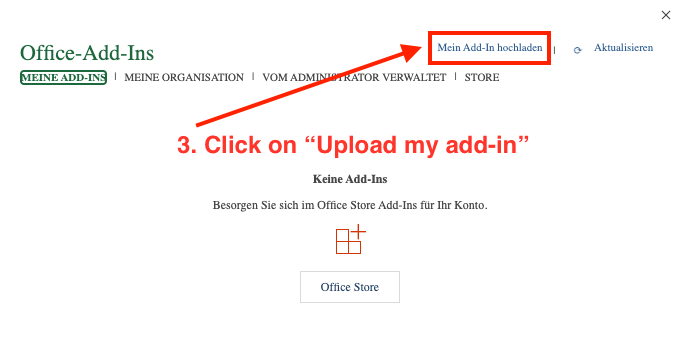
Step 3:
Upload the file you just downloaded called globalpackagetracker.xmlStep 4:
After installation, you can open the add-in to login and start using it!You can login with your credentials or with your API key:
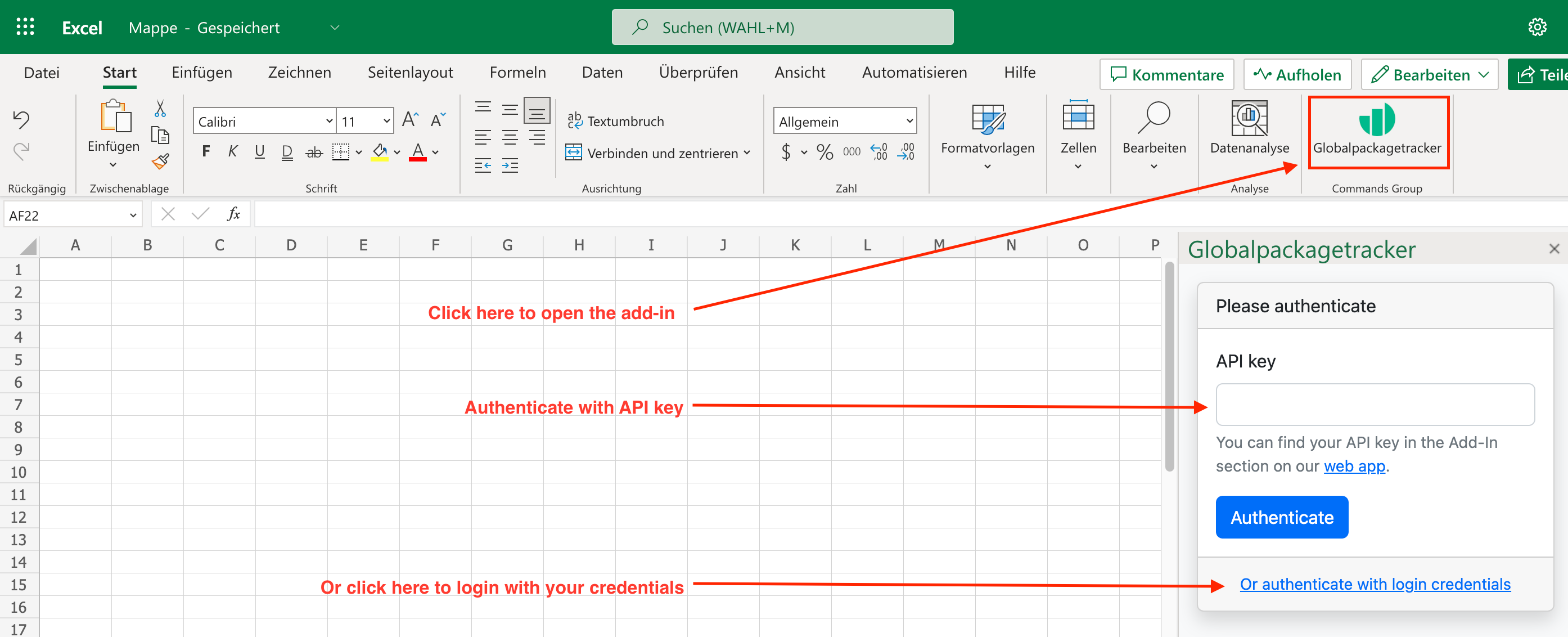
Step 5:
You can now start using our custom functions, as demonstrated in the image below. For example, type: =getStatus()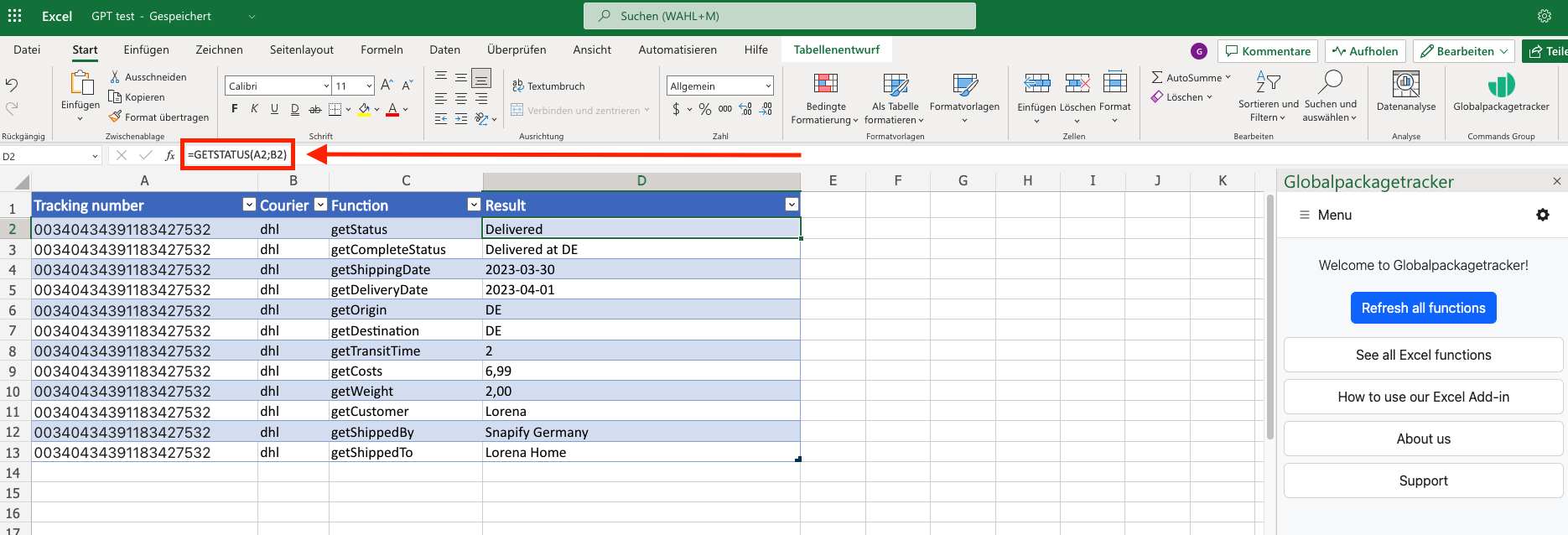
API request
Build API request
Please note that tracking
a new shipment will consume your capacity.
Please click on "Run test" above to see the response here.
Courier codes
| Courier name | Code |
|---|